KiCad setup
Install the KiCad 10 plugin through Plugin and Content Manager (PCM).
Add the Overprint repository
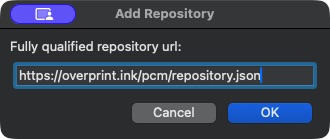
In KiCad’s project manager, open Plugin and Content Manager → Manage… → +. Paste this URL, click OK, then Save.
Install through PCM
Select Overprint from the repository list. Find Overprint, click Install, then Apply Pending Changes.
Restart the PCB Editor
Save your work, close all PCB Editor windows, then reopen your board in KiCad 10. The plugin starts automatically.
Open your board in Overprint
Click Scan for boards in Overprint and select your board. Later, use Sync to refresh it while keeping your artwork.
Prefer installing from a file? Download the ZIP, then choose Install from File… in PCM.
Download pluginFor the currently supported PCM procedure, see the KiCad manual.